 SQLly
Spilling big results to disk in a browser tab
How I prototyped spilling huge query results to OPFS in SQLly's browser build: why not localStorage, a tiny worker, real numbers, and what's left.
The desktop app has spilled big results to disk for months. The browser version, the one in the live preview and inside SQLly Embedded, still holds every row in the tab's memory. I prototyped fixing that this week. It works, it's fast, and it isn't shipped yet. Here's where it stands.
prototype Everything below runs in a prototype, measured in Chrome. None of it is in the browser build you can open today.
The problem
On the desktop, a result that passes 50,000 rows (or 64 MiB) gets written to a spill file and the grid pages it back from disk. Memory stays flat whether you fetch fifty rows or fifty million.
The browser build never got that. It's the same Rust app compiled to WebAssembly, but the spill
code was written against std::fs, which doesn't exist in a browser tab. So the browser
keeps everything. To see how bad that gets, I built 10 million result-shaped rows in memory the way
the tab does today: 2.5 GB of memory and 28.6 seconds of the
page doing nothing else. That's a tab that's about to die.
Where do you put a spill file in a browser?
I went through the options:
- localStorage is the first thing everyone suggests and it's useless here: around 5 to 10 MB, strings only, and every call blocks the page.
- IndexedDB has room, but it's async-only and built around records, not byte ranges. Reading "rows 4,000,000 to 4,000,200" means awkward chunking on top of a key-value store.
- OPFS, the Origin Private File System, is real files. The quota is a share of free disk (about 10 GB in my test profile), and inside a Web Worker you get a sync access handle: plain synchronous reads and writes at a byte offset.
That last part is the whole game. The desktop spill format is an append-only data file plus an offset index, read with seeks. A sync access handle does exactly that. So instead of inventing a browser format, I made the existing writer and reader generic over their storage, and the same code now runs on a file on your disk or on an OPFS handle. Same bytes on both.
The catch: the browser app has one thread
OPFS sync handles only exist in workers, never on the page's main thread. And it turns out the browser build of SQLly runs entirely on the main thread. The UI framework can use Web Workers for background work, but only in a build compiled with WebAssembly threads, and ours isn't.
So the design is one small dedicated spill worker. It owns the OPFS files and runs the real spill writer and reader. The page sends it batches of rows and asks it for pages, asynchronously. Rows cross between the two in the spill format's own row encoding, and the buffers are transferred, not copied. The worker's WebAssembly module is tiny: it uses 4 MB of memory, not the full app. It also doesn't need cross-origin isolation, so it works for Embedded hosts that don't send those headers.
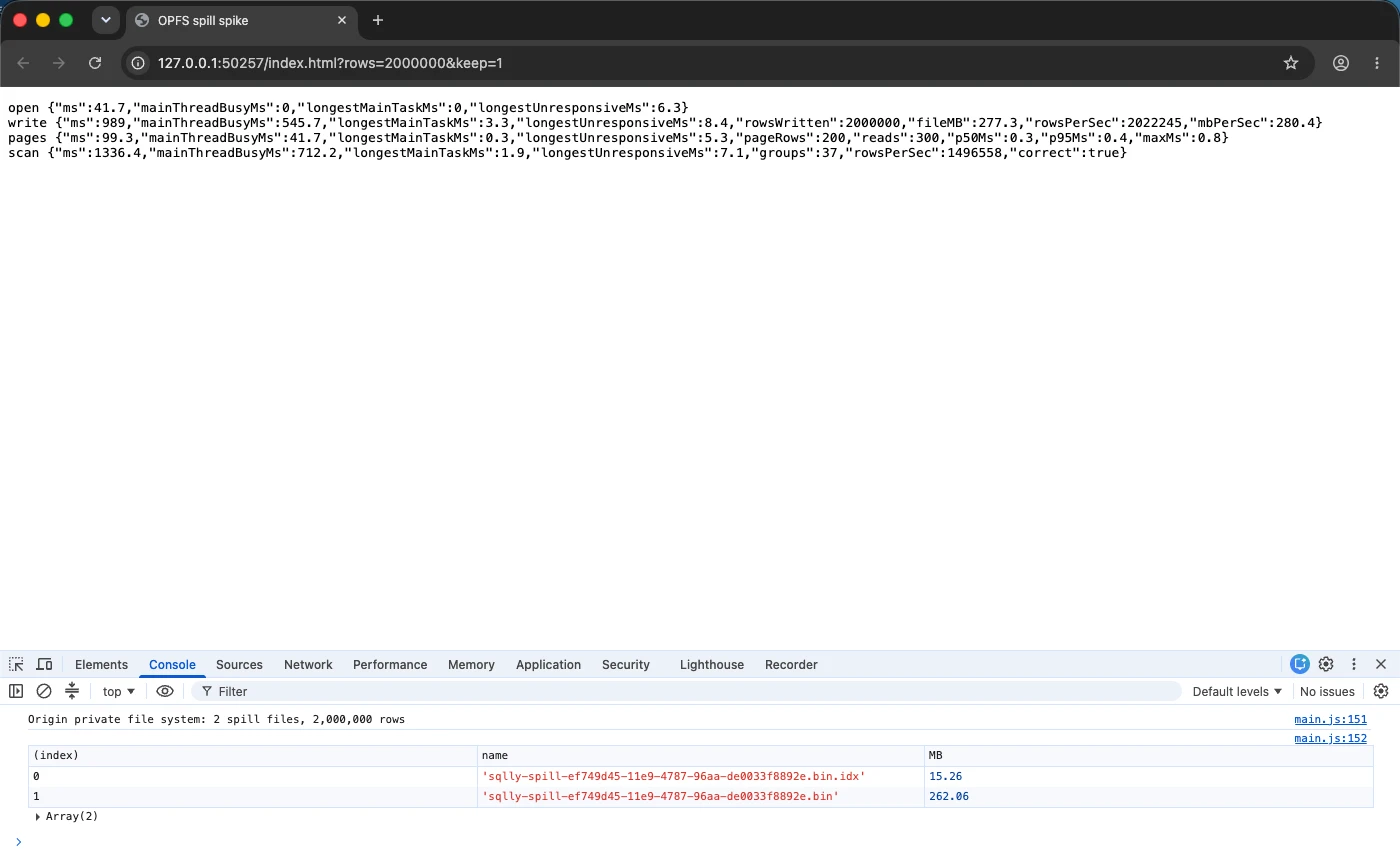
The numbers
Headless Chrome on a Mac, rows of seven columns (ids, names, a category, an amount, a flag, a timestamp, a sentence of text):
| 1M rows | 10M rows | |
|---|---|---|
| Spill file | 138 MB | 1.39 GB |
| Write | 0.34 s (about 400 MB/s) | 2.8 s (about 500 MB/s) |
| Random 200-row grid page, median / p95 | 0.1 / 0.2 ms | 0.1 / 0.2 ms |
| Full scan into a pivot-style sum | 0.29 s | 2.9 s |
| Longest page freeze | 9 ms | 11 ms |
| Page memory growth | 3.3 MB | 3.3 MB |
| Today, all in memory: memory growth | 255 MB | 2,555 MB |
A grid page coming back from a worker in a tenth of a millisecond is way under a frame, so scrolling should feel the same as on the desktop. The page never froze for longer than a frame, because all it does is encode rows on the way out and decode them on the way back. Every row read back and every scan total was checked against the generated data, so these aren't numbers from a broken run.
Why not just make the whole app multi-threaded?
I tried that too, same day. With WebAssembly threads turned on, the app boots, runs queries and draws
charts with four background workers. But it wasn't any snappier: the one real stall, about 300 ms
when 600,000 rows land in the grid, happens on the main thread either way. It also needed
eval for the thread library, which this site's security policy blocks. And it would mean
shipping two 74 MB builds, because a threaded build won't even load on a page without
cross-origin isolation. A dedicated worker gets the memory win without any of that.
What's left before it ships
Being straight about it, the spike proves the storage, not the product. Still to do:
- The browser query path has to spill past the threshold and announce it the same way the desktop does, so the results view needs no browser-only logic.
- About twenty places in the results view read the spill synchronously on the desktop (the first window, View Row as Form, cell lookups, export prefixes). In the browser each of those becomes a request to the worker.
- Pivot and chart already work on spilled results on the desktop (pivot, charts). In the browser those scans have to run in chunks or inside the worker.
- OPFS files survive a reload, so the tab needs its own startup cleanup, plus a fallback to memory when the storage quota is short.
- Safari and Firefox both ship OPFS sync handles, but I've only measured Chrome so far.
When it lands, it'll be in the changelog. Until then, if you want to poke at large results in a browser, the live preview holds a few hundred thousand rows fine. Millions are what this is for.