 SQLly
SQLlyOpen in SQLly: one click from a query to the workbench
SQLly Embedded launches can now open query tabs with the script, connection, parameter values and cursor set. How to build an Open in SQLly button.
The short version
One click from "this query failed" to a workbench with that query loaded.
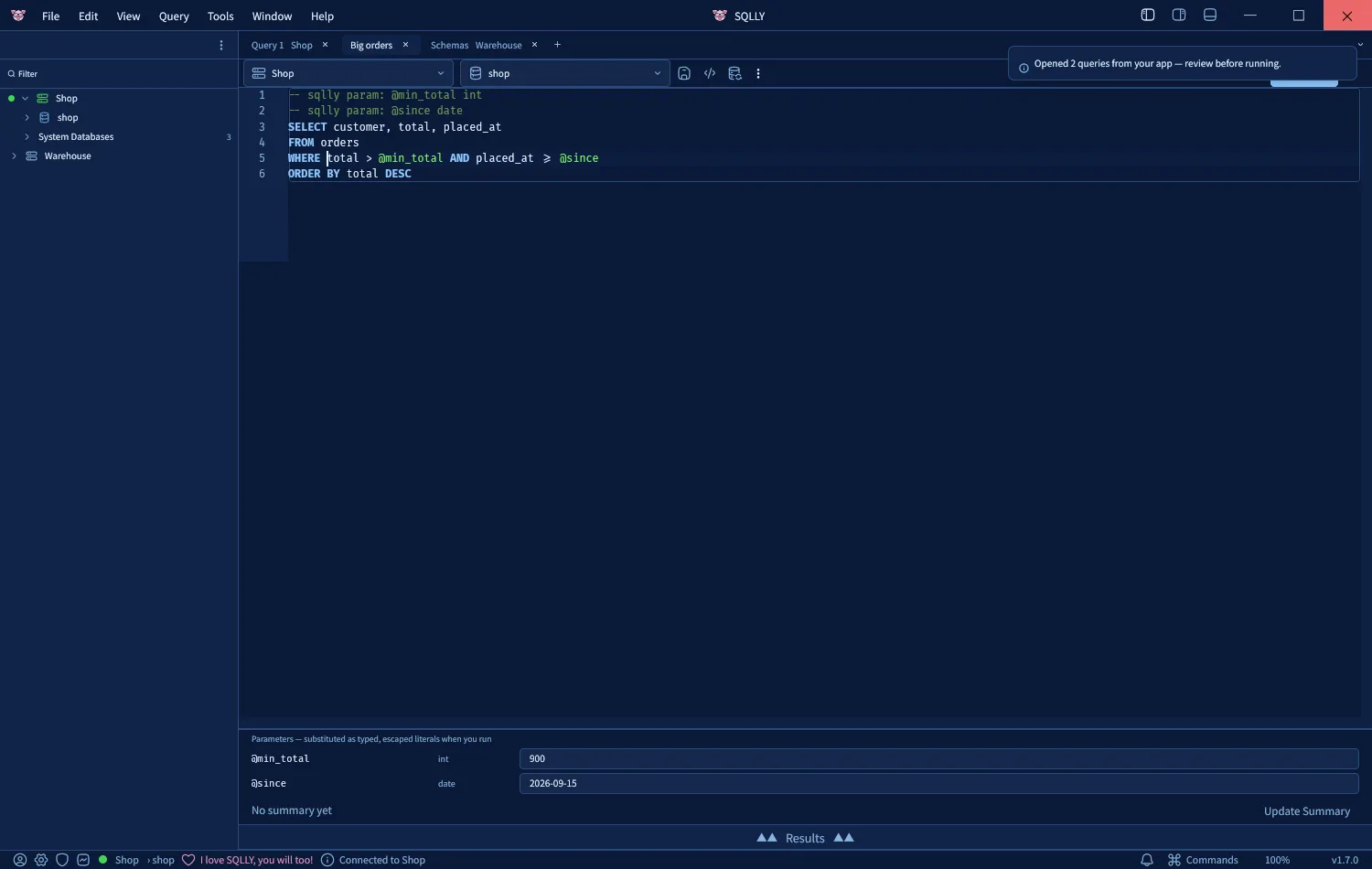
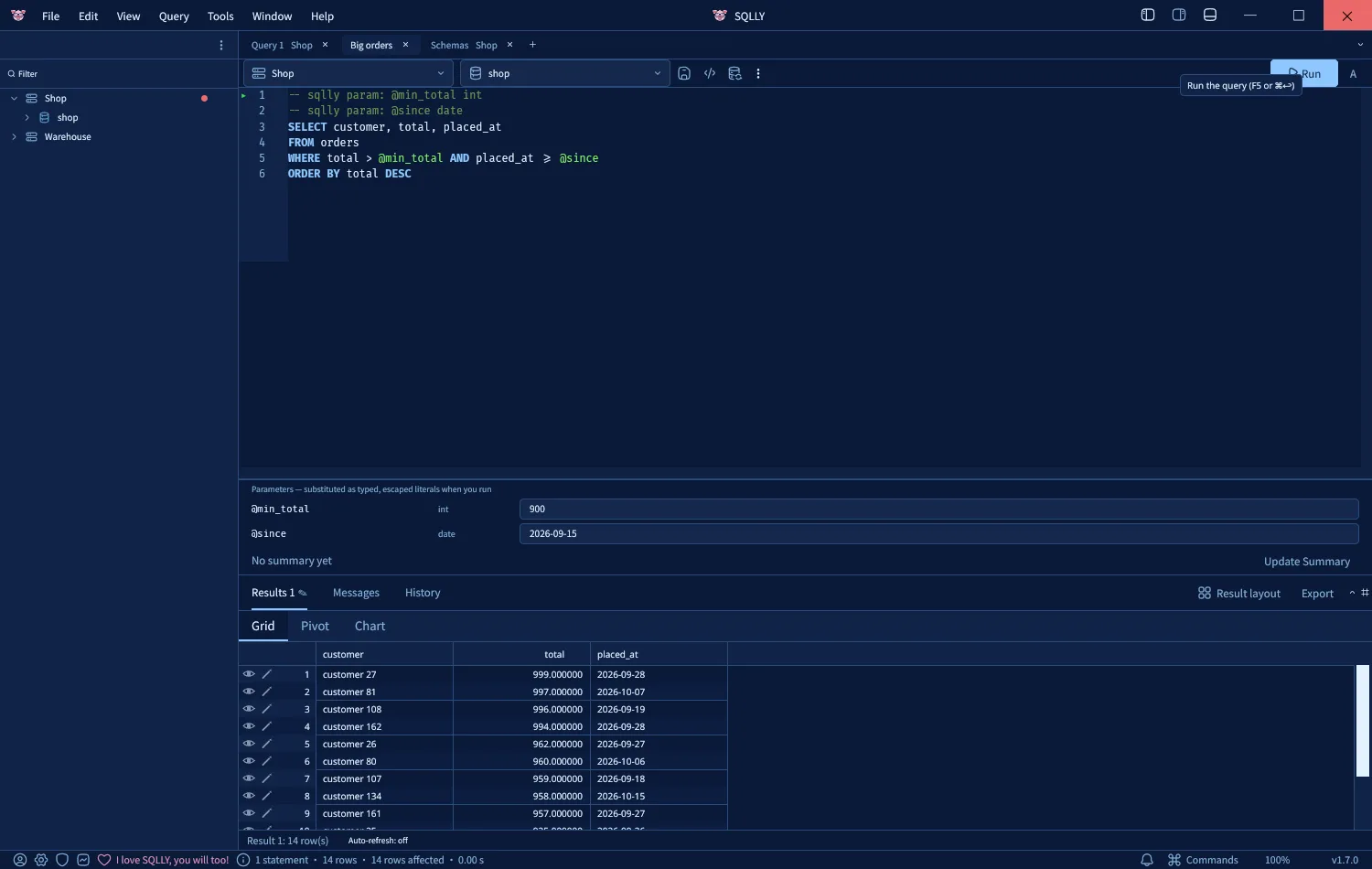
A SQLly Embedded launch token used to open an empty workbench. Now your server can say what to open: the script, the connection and database it belongs to, the values of its parameters, and where the cursor goes. The user lands in a connected tab with everything filled in, and nothing runs until they press Run.
Where it came from
The idea came from embedding SQLly in SQLPage, the framework
where every page of a web app is a .sql file. SQLPage is about writing SQL, and it
deliberately has no editor: no IntelliSense, no execution plans, no object explorer. When a
statement fails, the developer gets an error page, copies the SQL into another tool, recreates
the $parameter values by hand, finds the right database, and starts debugging there.
SQLly Embedded was already wired in, with a SQL function that mints a launch token on the server and a component that shows SQLly in the page. But a launch could only say who the user is and which connections they get. It couldn't say what they were doing. At render time, though, SQLPage knows exactly that: the failing statement, the values bound to it, and the database it ran against.
Why it lives on the launch token
We could have added a new endpoint, a deep-link format, or a message the host page posts to the SQLly frame. We didn't, because the launch token is already the one place where your app tells the bridge what a user gets. It is minted on your server with the manage token, it never carries a password, and the bridge checks seats, the licensed domain and the license on it. Going from "which connections" to "which connections, and what to open" is one more field on the same call:
POST /manage/tokens
{
  "user": "dana.analyst",
  "profile": "analysts",
  "open": {
    "connection": "Shop",
    "database": "sales",
    "title": "Big orders",
    "script": "SELECT customer, total\nFROM orders\nWHERE total > @min_total AND placed_at >= @since\nORDER BY total DESC",
    "parameters": { "min_total": 900, "since": { "type": "date", "value": "2026-09-15" } },
    "cursor": { "line": 3, "column": 7 }
  }
}
No new endpoint, no new authentication, and nothing about seats, origins or licensing changes. It also works for every SQLly Embedded integration, not just SQLPage: anything your app shows as SQL can get an "Open in SQLly" button.
Decisions worth explaining
Checked when the token is minted, not in the browser
The bridge resolves "connection": "Shop" against the token's own profile
when it mints the token. A name that isn't in the profile, an unknown field, a parameter value
that isn't a number, or a cursor past the end of the script is a 400 invalid_open,
and the reply lists every mistake with where it is:
{
  "error": "invalid_open",
  "message": "the launch context has 3 problems",
  "problems": [
    "open[0]: unknown field \"sql\" (allowed: connection, database, title, script, parameters, cursor)",
    "open[0].connection: no connection \"Shopp\" in this profile (it has: Shop, Warehouse)",
    "open[1].cursor: line 9 is past the end of the script (1 line)"
  ]
}
The developer writing the integration sees this the first time they try it. Without the check, a
user would see a broken tab weeks later. Refusing unknown fields matters more than it looks:
"sql" instead of "script" is the first typo everyone makes, and it
should fail loudly instead of opening an empty tab.
It is also a safety property. The browser only ever gets a connection id that the bridge resolved from the profile, and the engine only accepts connections from that profile. A launch can't point a session at anything the user couldn't already reach.
Nothing runs by itself
There is no "run": true, on purpose. The launch payload comes from your server, but
the person at the keyboard decides when SQL runs. SQLly's desktop query links follow the same
rule. "Open in SQLly" means show me, never do it.
Parameters go into the parameter strip, not into the SQL
SQLly already has typed query parameters. A -- sqlly param: @min_total int line
declares one, and a strip above the results holds its value. Launch parameters reuse that
feature. For each parameter the script doesn't declare, SQLly adds a declaration line above the
script. The values show up as typed, editable inputs, and the statements stay exactly as you
sent them. If you want to try a different date, you change one input instead of hunting through
the SQL.
To be precise about what happens next: when the user presses Run, SQLly checks each value
against its type and writes it into the statement as a literal in the correct form for that
engine, skipping strings and comments, before sending it. So the values are typed and checked by
SQLly, and your app never pastes them into SQL text, but they aren't server-side bind parameters.
Types come from the JSON: 900 is an int, 0.5 a
decimal, true a bool, a string is text, and
{ "type": "date", "value": "2026-09-15" } picks a type explicitly.
SQLly parameters are spelled @name on every engine. A host with its own syntax
renames them while building the payload. For SQLPage that is one regular expression,
$name → @name.
Delivered once
A launch token can be reused until it expires, which is what makes page reloads work. If every session of a token opened the tabs, each reload would stack another copy of the same query. So the bridge gives the tabs to the first session the token opens and then drops them. SQLly saves its workbench in the browser, so a reload restores what the user had, including the tab that was opened for them.
The rule that follows for integrators is simple: mint a fresh token for every "Open in SQLly" click. A new token for a user who already holds a seat doesn't cost another seat.
Tabs first, connections second
In the browser, SQLly opens every requested tab, gives each one its connection and database, and then focuses the first one, which connects the usual way. The order matters: if a server is down or a password has rotated, the user still has all their tabs with the SQL intact and gets the real connection error. Nothing they were sent is lost.
Recipe 1: reopen anything from the audit trail
The bridge already keeps an audit trail of every query: who ran it, which profile and connection, which database, the SQL, and how it ended. That is everything a launch needs, so the sample admin app now has a Reopen in SQLly button on each complete statement in its Queries page. Click it on a failed query and you're in SQLly as an admin, on the same connection and database, with the statement loaded and the tab titled "Failed from bob".
const entry = (await bridge('GET', '/manage/queries?limit=1000')).queries
  .find((q) => String(q.sessionId) === form.session && q.id === form.id);
if (!entry || entry.kind === 'row-edit' || entry.sqlTruncated) return refuse();

const open = {
  connection: entry.connection,
  title: `${entry.status === 'failed' ? 'Failed' : 'Query'} from ${entry.user}`,
  script: entry.sql,
};
if (entry.database) open.database = entry.database;
await bridge('POST', '/manage/tokens', { user: `admin:${admin.id}`, profile: entry.profile, open });
For a failed statement it goes one step further. PostgreSQL errors carry a
POSITION (a character offset into the statement) and MySQL errors say "at line
N", so the sample app turns those into the launch cursor. Bob's
sum(totals) opens with the caret right in front of totals, the column
that doesn't exist.
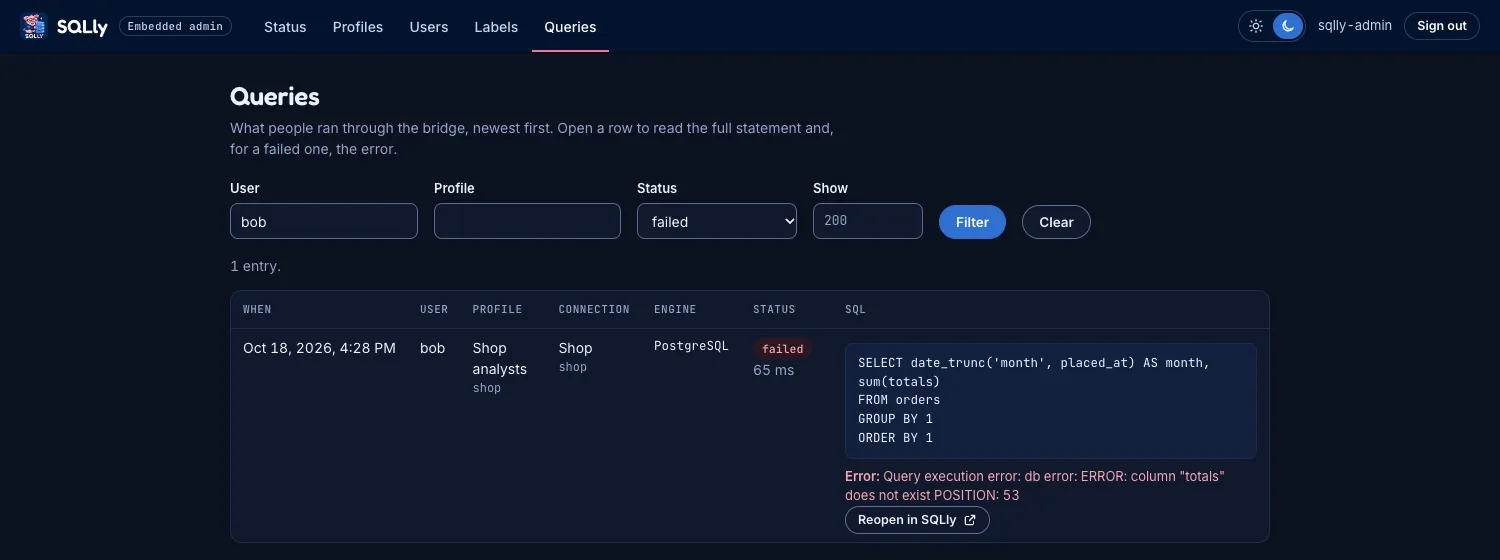

totals.One design detail: the button's form sends only the row's identity, never the SQL. The server looks the row up on the bridge again, so the page can reopen only what the audit trail actually recorded. Row edits and statements the log truncated have no button, because reopening half a statement helps nobody.
Recipe 2: "Open in SQLly" on an error page
This is the SQLPage case, and it works the same for any app that runs SQL of its own, such as a report builder, a scheduled job or an admin console. When a statement fails, the app knows the statement, its values and the line the database complained about. Put a button on the error page that mints a launch with all of that:
// failure = { sql: 'SELECT … WHERE id = $id', params: { id: 42 }, line: 3 }
const minted = await bridge('POST', '/manage/tokens', {
  user: req.user.id,
  profile: 'app-database',                   // a profile pointing at the app's own database
  open: {
    title: 'Failed statement',
    script: failure.sql.replace(/\$([A-Za-z_]\w*)/g, '@$1'),
    parameters: failure.params,
    cursor: failure.line ? { line: failure.line, column: 1 } : undefined,
  },
});
The developer goes from the error page to a workbench on that statement in one click, with IntelliSense against the real schema, the object explorer and an execution plan a keystroke away. Offer it only where a workbench on that database is appropriate, such as development environments or administrators. The profile still decides what the user can reach.
Things we ran into
- Line endings. A script from a Windows editor arrives with
\r\n. SQLly's editor works in\n, so a cursor computed from the original text would land a character early on every line. The bridge converts the script to\nbefore it checks the cursor, so line and column mean what the user will see. - Columns are characters, not bytes.
WHERE name = 'é'has a two-byte character in it. The cursor counts characters, as an editor's status bar does. - The script may already declare the parameter. If it does, with its own type and default, the script's declaration wins and only the value comes from the launch. Adding a second declaration would have been confusing, and replacing the author's type would have been wrong.
- The Origin rule still applies. A launch token is no use from another site. The bridge refuses a WebSocket from any origin outside your licensed domain before it reads the token, so even a leaked token, with or without tabs, can't be used from someone else's page.
- Testing it end to end found an older bug. Through the bridge, SQLly listed a server's databases with SQL Server's
sys.databasesquery whatever the engine was, so connecting to PostgreSQL showed "relation sys.databases does not exist". It never showed up in our SQL Server testing. Each engine now uses its own catalog query. - Tabs on different servers. An inactive tab's label used to show the server of the tab you were looking at. With a launch that opens tabs on two servers, that was obviously wrong, so the label now names each tab's own server.
- Trial plans allow one session per seat. Every "Open in SQLly" click opens a new browser tab and a new session. On the trial, the user has to close their previous SQLly tab first, or the bridge says they already have the maximum number of sessions open. Paid plans allow four.
What's next
Launch context covers getting a query into SQLly. Next is getting a query back out: a per-launch save hook, so that when the user saves, the edited script goes to an endpoint your app chooses. For SQLPage that would mean editing the live app in the browser, with IntelliSense against the real schema, which SQLPage has never had. If you have a use for it, tell us how you'd use it.
Launch context is in the current SQLly Embedded package. The guide is at Open SQLly on a query, and the API reference has the full schema.