 SQLly
SQLlyWhy we built SQLly Embedded
How SQL-savvy testers, analysts and accountants went from SQL logins in Azure Data Studio, SSMS, DataGrip and VS Code to querying through SQLly with no credentials.
The elevator pitch
Your team already knows SQL. Stop handing them passwords.
SQLly Embedded puts a full SQL client in the browser, inside the app your people already sign in to. A small bridge on your server holds the database credentials. Your app decides who gets which connections. Users click Open SQLly and start querying, read-only if that's what you chose.
Profiles and access are created through an API, so new databases show up for the right people automatically, and disappear when they should. Run the standalone Node reference app as-is, or use it as the blueprint for building SQLly into your own app.
SQLly Embedded did not start as a product idea. It started as the same request turning up in two internal systems that have nothing else in common: "Can I just query it myself?"
Our answer, both times, was a SQL login for Azure Data Studio, SSMS, DataGrip or VS Code's database extension. Saying yes was easy. Saying yes safely, without handing out passwords, was the part we kept getting wrong. Embedded is what replaced those logins.
System one: a full environment for every branch
Our branch management tool exists so that anyone can stand up an entire, working environment from a branch in a few minutes. Pick a branch of our accounting, HR and payroll app, and the tool:
- Checks out the branch and gives it its own SQL Server with two new databases: the application database and the auth database.
- Fills them from a copy of dev, a copy of production, or a fresh empty database.
- Applies the branch's migrations on top.
- Starts the API and the web front end, and gives the environment its own URL.
The result is a fully functional system running unreleased code against real data. That is exactly what our testers and business analysts need, and they are all comfortable in SQL. Before they sign off a payroll or fixed-asset change, they want to look at the rows, not just the screens:
- Did this branch's payroll run post the same journal lines as last month?
- Which employees changed category?
- Does the asset register still balance?
How we gave them access
We passed them credentials. Every branch database got SQL logins, and people connected however they liked:
| Tool | How it was connected | The catch |
|---|---|---|
| Azure Data Studio, SSMS, DataGrip | A SQL username and password per branch, copied into each person's client. | Passwords lived on every laptop, in saved connections and in people's notes. |
| VS Code's database extension | Built into the branch tool's in-browser VS Code, preloaded with the branch's login. | Anyone with the editor had the database owner's credentials. |
Branches come and go every few days, and each one brought two new databases. Who could see them also changed from branch to branch: it depended on who had access to that branch. So every new environment meant another round of logins to create, hand to the right people, and eventually clean up. We even added a rotate button that issues a new username as well as a new password, because old connection strings kept turning up where they shouldn't.
System two: one place to report across many systems
The second system is a report builder. It brings the back-office databases of several casino properties together with our ERP on one SQL Server, and builds reports across all of them: trial balances, P&L by business unit and cost center, AP aging, cage and slot reports.
The reports are written by an AI coding agent against the real data, so new ones are cheap. That exposed the real demand:
- One finance user got three versions of the same P&L in a single day, each a slightly different cut.
- Another report exists only to answer "why did the month change?"
Those aren't report requests. They're someone thinking out loud, and the accountants and analysts asking them know SQL. The answer was the same as before: give them a SQL login and let them connect from SSMS, Azure Data Studio or DataGrip. That meant broad credentials for a database holding every property's finances, sitting on a growing number of laptops.
What both systems actually needed
Side by side, the list was short and identical:
No credentials in human hands
Not in a connection string, a URL or a downloaded file. Nothing to leak, nothing to rotate.
The app decides who you are
Both systems already have sign-in. No second user directory just for SQL.
Different people, different connections
Accountants get the ledger read-only. The QA lead gets the branch database with write access.
Guard rails beyond grants
SELECT-only, confirm-before-change and a production banner, enforced by the client.
Set up by a script
Access appears when a branch is created and disappears when it's torn down. No tickets.
A real query tool
Schema-aware IntelliSense, a fast grid, pivots, charts and export. These are power users.
The last one was already SQLly. Everything else was plumbing that neither Azure Data Studio, SSMS, DataGrip nor a VS Code extension could give us, because they all start from the same place: a person holding a password.
What we built
SQLly Embedded is SQLly's browser build plus
sqlly-bridge embedded, a proxy you run next to your app. A session works
like this:
- Your app signs the user in the way it already does. The bridge has no user accounts.
- Your server asks the bridge for a launch token for this user and this profile. A profile is a named set of connections with its safety rules.
- The browser opens SQLly with the token. The bridge checks the token, the page's Origin and the seat count.
- The bridge starts an engine with the profile's credentials. The browser only ever gets connection names and labels, never a secret.
Creating a profile, testing a connection, minting a token and releasing a seat are each one call on a management API that only your server can reach. That is what turns "access appears when the branch is created" into a few lines in a deploy step.
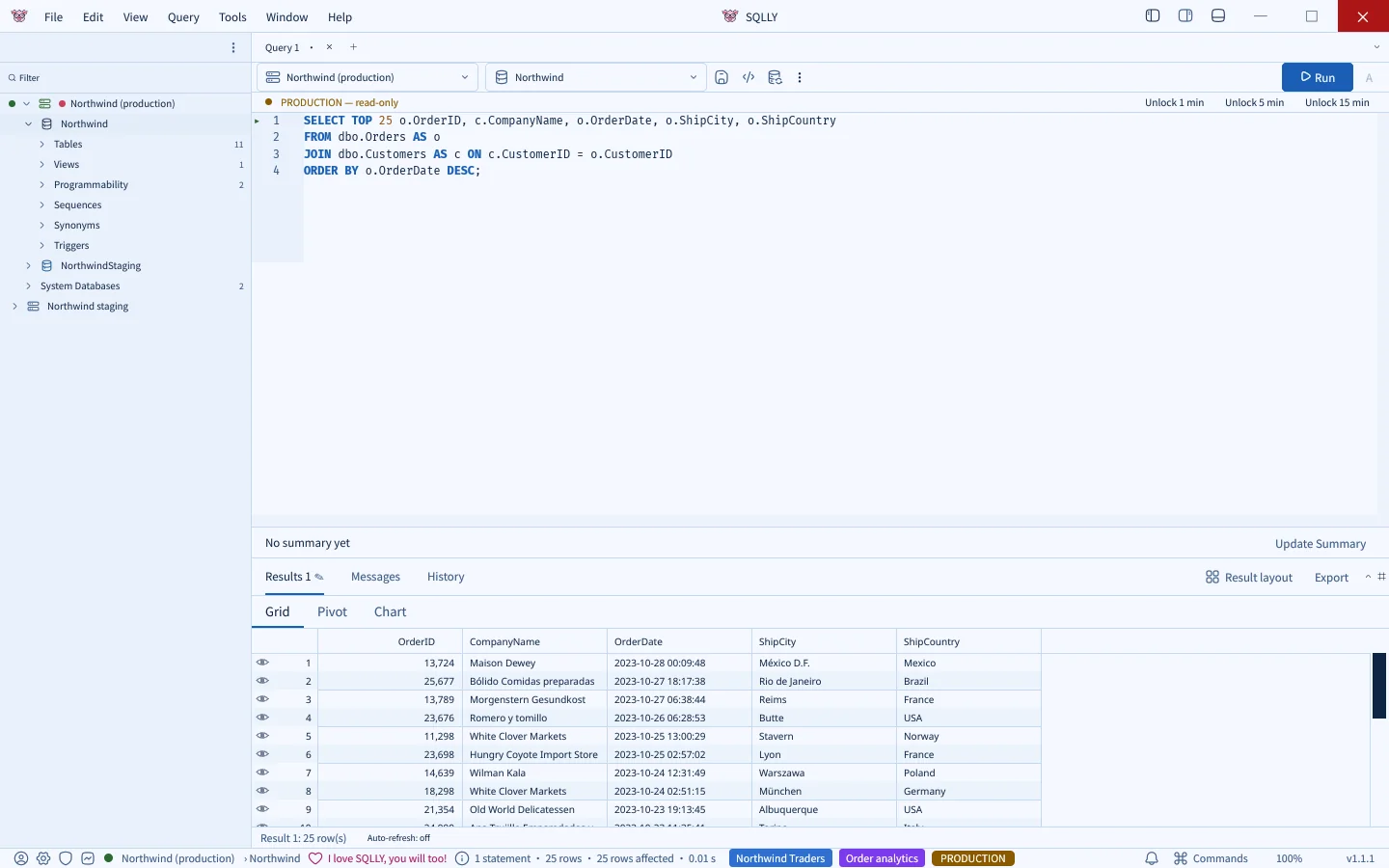
The user signs in to the app they already use, clicks a button, and SQLly opens:
Before and after
| SQL credentials in desktop tools | SQLly Embedded | |
|---|---|---|
| What grants access | A username and password | A token for one user, valid for minutes |
| Who decides identity | Whoever has the password | Your app, through one API call |
| Per-person connections | One SQL login per group, created by hand | Yes, one profile per group |
| Read-only for analysts | Only via a separate SQL login | A profile with SELECT-only rules |
| New branch environment | Create logins, share them, clean up later | One API call writes a profile |
| Someone leaves | Rotate the password for everyone | Your app stops minting their tokens |
Both apps do all of it automatically
The point was never to give people a new tool to configure. In both systems, nobody sets up a connection, a user or a proxy by hand. Each app owns three jobs:
1. Setting up the bridge
The app's own deployment installs and starts sqlly-bridge embedded, gives it a management token, and links it to the license once.
2. Creating profiles
The app writes connection profiles through the management API whenever databases appear, change or go away.
3. Controlling who sees what
The app decides which profile each signed-in user gets, and only mints launch tokens for people who should have one.
In the branch tool
- Bridge: set up once, alongside the tool itself. There is no proxy to stand up per branch.
- Profiles: standing up a branch environment writes a profile covering both of its new databases, right after the migrations run. Tearing the branch down deletes it.
- Access: follows access to the branch. Testers and BAs on that branch get a read-only profile, and developers get the owner profile. Someone who can't see the branch can't open its databases.
In the report builder
- Bridge: installed and started by the report builder's deploy script, listening only where the site can reach it.
- Profiles: generated from the databases the report builder already manages: the ERP and each property.
- Access: accountants get a SELECT-only profile with the ERP and the properties they cover, and the people building reports keep a broader one. They open SQLly from the site they already sign in to.
In both, nobody copies a password into Azure Data Studio, SSMS, DataGrip or VS Code. Seats are concurrent rather than named: a seat is held while someone has SQLly open and frees when they close the tab, which fits how this access actually gets used, in bursts around a release or month end.
A standalone reference app you can run today
Our two systems are internal, so we built a third one you can have. SQLly Embedded ships with a fully standalone reference app in Node.js (Node 20+, no dependencies) that does the same three jobs:
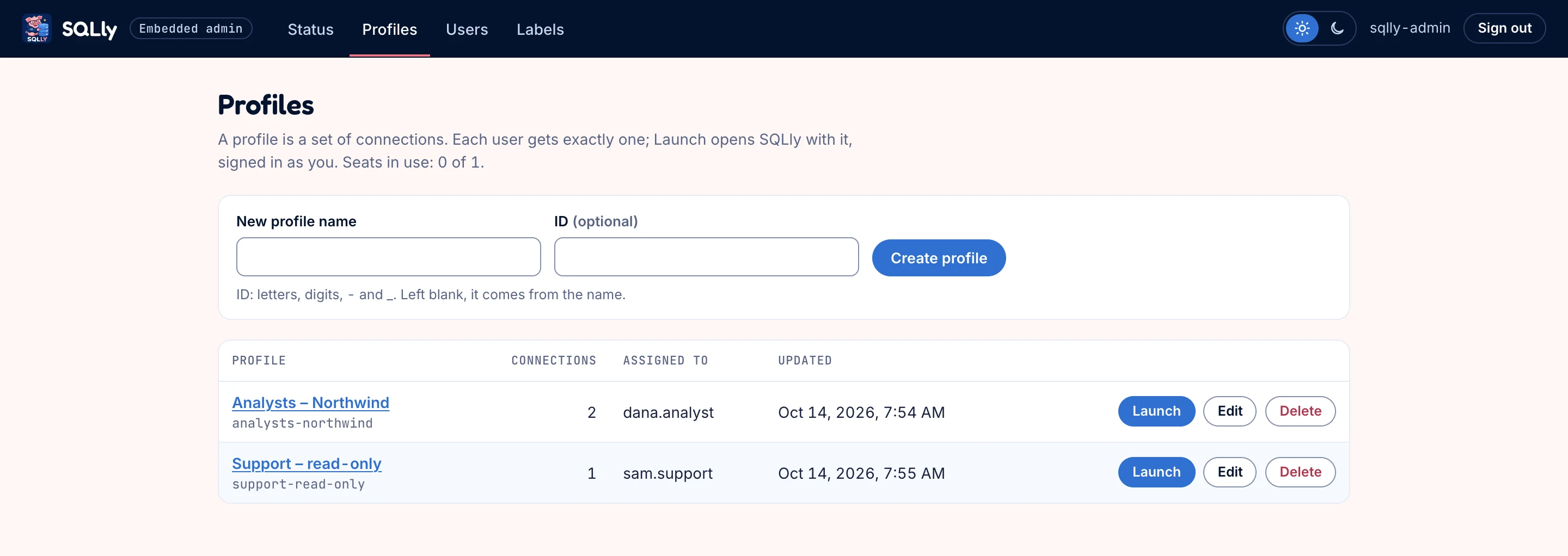
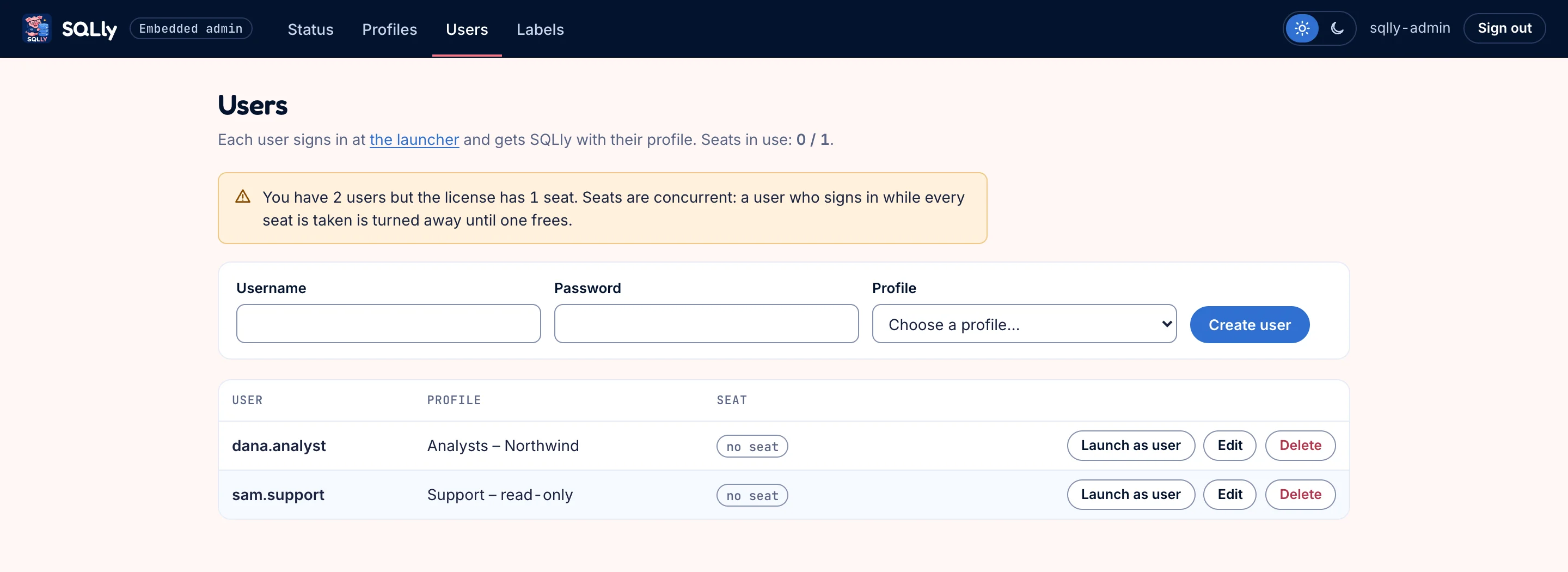
- An admin side to link the bridge to your license, build and test connection profiles, set up labels and safety rules, and create users.
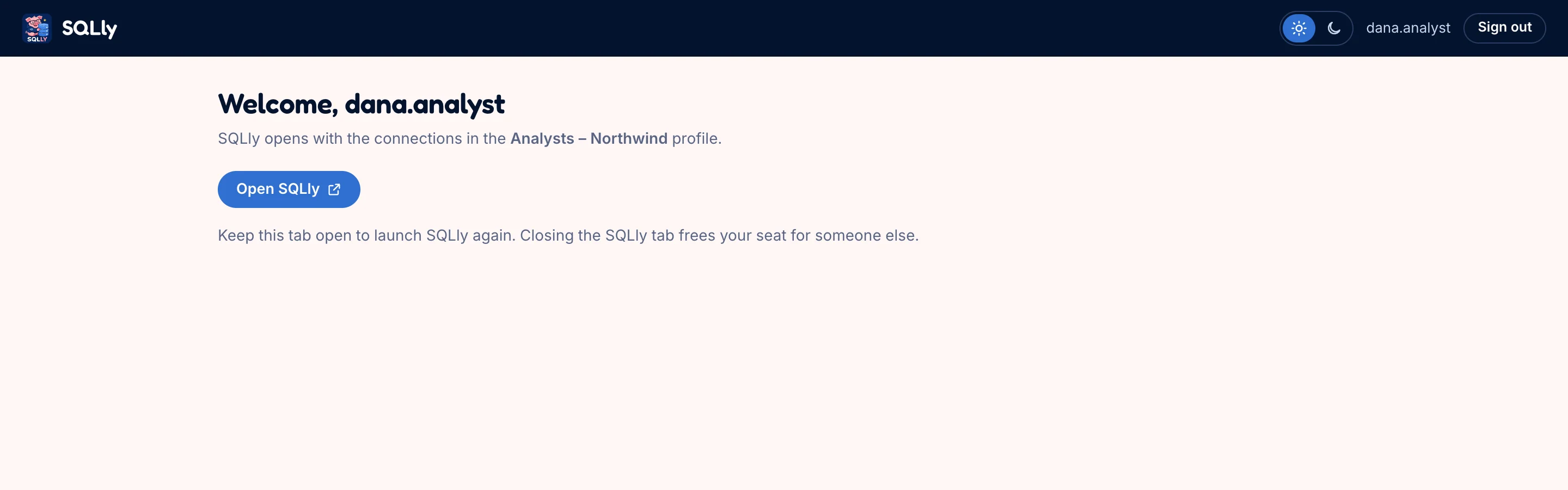
- A user side where people sign in and click Open SQLly to get the profile they were assigned, and nothing else.
Use it in one of two ways:
Stand it up in isolation
Run the bridge and the reference app next to a database and you have a working, credential-free SQL portal for your team, with no code of your own.
Use it as a blueprint
Every screen is a thin layer over one or two management API calls, so it shows exactly what to add to your own app's sign-in, deploy and admin pages.
What we left out on purpose
The bridge is not an identity provider, a permission system or a query auditor. Your app already does sign-in, and your database already does grants. Embedded sits between them and keeps the credential on your server.
Queries, results and credentials never pass through sqlly.app. The bridge only checks its license there, or not at all with an offline license file.
Trying it
Every sqlly.app account includes a three-month, single-user trial, and every SQLly Lifetime license includes a five-user Embedded license. Download the package, start the bridge and the reference app, and you can see the whole flow against your own database before writing any code.
- Quick start: running in a few minutes.
- The reference app: every screen, and the API call behind it.
- Building it into your own app: the same three jobs, in your code.
- How it works: when you're ready to wire it into your own system.