 SQLly
SQLlyHeatmaps
functionalSee where thousands of locations cluster, with an adjustable radius, instead of a pile of overlapping markers.
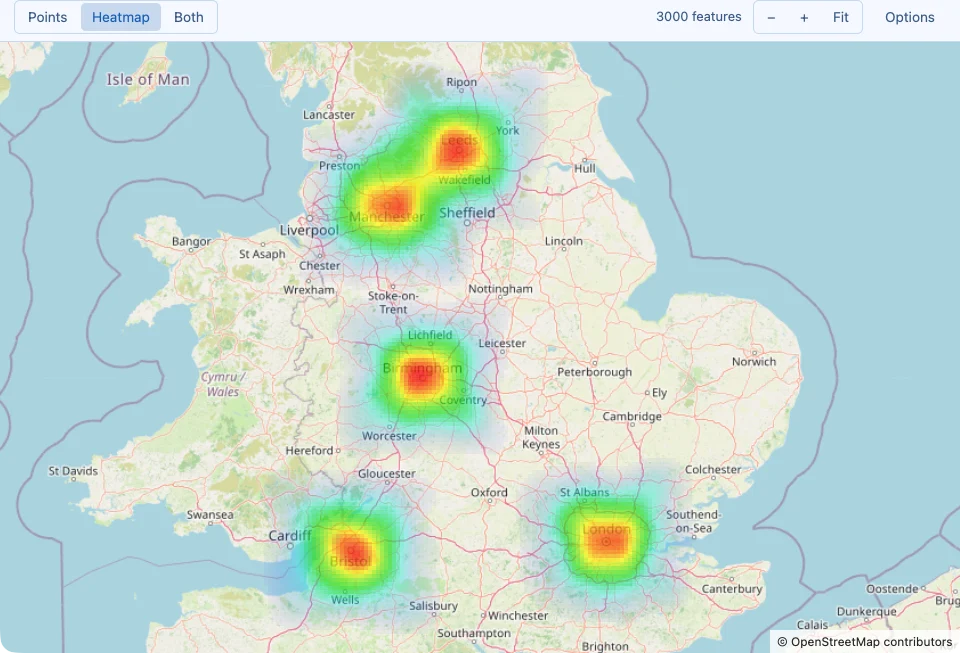
Ten thousand delivery addresses on a map are ten thousand overlapping dots. A heatmap answers the question you actually had - where do they cluster? - by coloring the map by how many locations are nearby: cool blue where there are a few, through green and yellow, to red where they are densest.

Turning it on
Open a map (right-click a result cell › Tools › Show on Map…, or the value viewer's Map mode) and click Heatmap in the toolbar's Points / Heatmap / Both switch. Both draws the heat with the markers on top; Points goes back. Everything that can be mapped can be shown as a heatmap: Redis GEO replies, longitude/latitude columns, and geometry columns.
What it shows
- Each location adds a soft bump of heat around itself. Where bumps overlap, they add up, so a block with forty points glows far hotter than one with two.
- Colors are relative to what is on screen. The hottest spot in the current view is always red, and everything else is scaled against it. Zoom into a neighborhood and its own hot spots turn red; zoom out to the country and only the busiest cities stay red. That makes the heatmap good for “where, relatively?” and not for reading absolute counts - use Pivot or a
GROUP BYfor those. - Faint areas are left clear (anything under 2% of the peak), so the street map stays readable around the clusters.
- Lines and polygons count once each, at the average position of their points, and their outlines stay drawn on top of the heat so you can still see the shapes themselves. Point markers are hidden in heatmap mode; hovering and clicking still find the nearest feature.
- It follows the map. The heat is recomputed as you pan and zoom, and it works the same on the plain sketch when street map tiles are off, offline, or in the browser.
Heatmap controls
The heatmap's settings are in the map's Options panel, under
Layers, and in the -- sqlly map: directive:
| Panel control | Directive | What it does |
|---|---|---|
| Show | mode=heatmap / mode=both | Heat only, or heat with the markers on top. |
| Heat weight | weight=col | Each location adds heat in proportion to a number - orders, revenue, readings - instead of counting 1. NULL and negative values add nothing. |
| Radius | radius=px | How far each location's heat spreads, in screen pixels: 6 to 120, in steps of 6 in the panel (default 24). |
| Blur | blur=px | Extra softening on top of the radius, 0 to 200 pixels (default 0), for a smoother, cloudier picture. |
| Intensity | intensity=n | Multiplies the heat before coloring, 0 to 10 (default 1). Above 1, moderate areas reach the hot colors sooner, which helps a few faint clusters stand out next to one dominant one. |
| Opacity | opacity=n | The most opaque the hottest cells get, 0 to 1 (default 0.8), so you can see more or less of the street map underneath. |
| Palette | palette=name | Heat (blue to red, the default), Fire (dark red to pale yellow), Viridis (purple to yellow, readable with color-blindness), Ocean (pale cyan to deep blue), or Theme accent (your theme's accent color, faint to strong). |
| Radius | Good for |
|---|---|
| Small (6–18 px) | Tight, precise hot spots: individual buildings, a single street, or many points that are already dense. |
| Default (24 px) | A balanced picture at most zoom levels. |
| Large (36–120 px) | Sparse data, or the broad shape of a spread: which side of town, which region of the country. |
Because the radius is measured on screen, it means the same visual size at every zoom level: zooming in turns one blob into the separate hot spots it was made of.
-- sqlly map: mode=heatmap; weight=orders; radius=30; blur=6; intensity=1.5; palette=viridis
SELECT lat, lon, COUNT(*) AS orders FROM deliveries GROUP BY lat, lon;


Points or heatmap?
| Use points when | Use the heatmap when |
|---|---|
| There are up to a few hundred locations and each one matters. | There are thousands, and markers pile on top of each other. |
| You want to hover and click specific rows. | You want to see where activity concentrates. |
| The data is lines and polygons you want to read as shapes. | The data is many points (stores, sensor readings, sign-ups, trips) and density is the story. |
Limits
- Every row counts the same unless you weight it. Without Heat weight (
weight=), the heatmap measures how many locations are near each other, not how much happened at them. - Relative colors, as above: a red spot in one view and a red spot in another are not the same number.
- The 50,000 feature cap applies: on a larger result the heatmap shows the features the map drew, and the toolbar's Showing N of M features note says so.
- Screen-sized cells. Heat is computed on a 6-pixel grid over the window, which is plenty for seeing clusters but is not a substitute for spatial analysis in the database.